Best Robot Vacuum for Elderly: Set-It-and-Forget-It Cleaning for Seniors
Robot vacuums give elderly individuals clean floors without lifting, bending, or pushing. Find the best robot vacuum for seniors — easy app setup, reliable cleaning, voice control.
Table of Contents
- Best Robot Vacuum for Elderly: Set-It-and-Forget-It Cleaning for Seniors
- Why Robot Vacuums Are Ideal for Seniors
- What Elderly Users Struggle With in Robot Vacuums
- What to Look For in a Robot Vacuum for Elderly Users
- Best Robot Vacuums for Elderly Users in 2026
- Setup Guide for Non-Tech-Savvy Elderly Users
- Buying a Robot Vacuum as a Gift for an Elderly Family Member
- Frequently Asked Questions
- Conclusion
Best Robot Vacuum for Elderly: Set-It-and-Forget-It Cleaning for Seniors
For many older adults, vacuuming is no longer a simple chore. Arthritis, limited mobility, balance concerns, and general fatigue can turn what was once a routine task into something genuinely difficult — or even unsafe. Pushing a heavy upright vacuum across the living room, maneuvering it around furniture, carrying it up the stairs, and bending down to empty the dustbin are all physical demands that add up quickly.
A robot vacuum eliminates every single one of those demands.
You place it on its dock once. You press a button — or speak a single voice command — and it cleans the floors on its own. It returns to its base when finished, and if you choose a model with a self-emptying station, it even handles the dustbin for you. For elderly users living independently, or for family members looking to reduce the physical burden on a parent or grandparent, a robot vacuum is one of the most meaningful quality-of-life upgrades available today.
This guide is written specifically for elderly users and the families who care about them. We explain why robot vacuums are particularly well-suited to seniors, what makes certain models frustrating for older adults, what features to prioritize, and which specific products are worth buying in 2026.
Why Robot Vacuums Are Ideal for Seniors
The appeal of a robot vacuum goes beyond simple convenience. For elderly individuals, autonomous cleaning addresses several real and serious daily challenges.
No Physical Effort Required
Traditional vacuuming demands continuous physical activity: pushing and pulling a heavy machine, navigating around furniture legs, maintaining an upright posture, and crouching to reach under beds and sofas. For someone managing arthritis, chronic back pain, reduced grip strength, or post-surgery recovery, each of those actions carries real risk of strain or injury.
A robot vacuum requires none of it. The machine moves autonomously across the floor. The user’s only physical interaction is occasionally emptying the dustbin — or, with a self-emptying model, not even that for weeks at a time.
Automatic Scheduling Means Clean Floors Every Day
Humans skip vacuuming when they feel tired, when they are not home, when company is coming and there is no time, or when the task simply feels like too much. A robot vacuum does not skip anything.
Most robot vacuums allow you to set a daily or weekly cleaning schedule through their companion app. Once programmed, the robot runs automatically at the same time every day without any input from the user. Many models also run automatically when no one is home — triggered by a feature like iRobot’s “Clean While I’m Away” — so floors stay consistently clean without any conscious effort at all.
For elderly users, consistent floor cleanliness is not merely an aesthetic preference. Crumbs, dust, and debris on hard floors create slip hazards. Regular automated vacuuming reduces that risk in a practical, daily way.
Voice Control Through Alexa and Google Assistant
Many of the best robot vacuums on the market today work natively with Amazon Alexa and Google Assistant. This means a user who already has an Echo device or Google Nest speaker in their home can start, stop, and dock the robot using only their voice. No app needed. No buttons to find. Just a clear spoken command: “Alexa, ask Roomba to start cleaning.”
For elderly users who may find touchscreens difficult, apps confusing, or small buttons hard to press, voice control is a transformative accessibility feature.
Supports Independent Living
For older adults who live alone, the ability to maintain a clean home without assistance is a point of genuine independence and dignity. A robot vacuum that runs reliably every day, without requiring technical troubleshooting or physical exertion, is one less reason to need help. For adult children living at a distance, it also provides peace of mind — the floors are being cleaned consistently, even when no one else is there to help.
What Elderly Users Struggle With in Robot Vacuums
Not every robot vacuum is well-suited to an elderly user. The same features that tech-savvy younger buyers appreciate can be genuine barriers for older adults.
Complex App Setup and Configuration
Many premium robot vacuums require extensive in-app configuration before they will run properly — creating room maps, setting no-go zones, adjusting cleaning modes, connecting to Wi-Fi networks. For a user who is not comfortable with smartphones or apps, this initial setup can feel completely overwhelming. Features buried four menus deep might as well not exist.
The best robot vacuums for seniors either have genuinely simple apps with large, clear text and minimal required steps, or they can be operated entirely without an app, through a single physical button or voice command alone.
Small Text and Poor Visual Feedback
App interfaces on many robot vacuums are designed with a younger, tech-native audience in mind. Small font sizes, low-contrast color schemes, and dense information displays can make the app difficult or impossible to use for someone with reduced vision. Physical controls — a single large “Clean” button on the robot itself — remain the most accessible option for many older users.
Difficult Dock Placement and Cable Management
A robot vacuum dock needs to be placed against a wall with clear access, on a hard floor surface, with a power cable running to a nearby outlet. For elderly users with limited mobility, placing the dock in an optimal location, routing the cable safely, and adjusting the setup if the robot struggles to return home can all be sources of frustration. A family member typically handles the initial installation, but ongoing repositioning should be straightforward enough that the user can do it themselves if needed.
Frequent Dustbin Emptying
Standard robot vacuums carry small dustbins — often between 300 and 600ml — that fill up quickly in homes with pets, rugs, or high dust levels. Emptying the dustbin requires physically removing it from the robot, carrying it to a trash can, and pressing a release to empty it. This is manageable for most people, but for someone with reduced hand strength or dexterity, it can be a frustrating repetitive task.
The solution is a self-emptying base station, which automatically vacuums the robot’s dustbin into a large onboard bag or bin after each cleaning run. Self-emptying stations can go 30 to 60 days between needing to be serviced, dramatically reducing the frequency of manual intervention.
What to Look For in a Robot Vacuum for Elderly Users
Given the challenges above, these are the features that matter most when selecting a robot vacuum for a senior.
Large Self-Emptying Base Station
This is the single most important feature for elderly users. A robot vacuum with a self-emptying station handles its own waste disposal after every run. The user never needs to crouch down, pull out a dustbin, or carry debris to the trash — not for 30 to 60 days at a stretch. Look for models with at least 30-day capacity and bagless bases that are easy to empty when the time comes, without complex disassembly.
Simple App or Voice-Only Operation
The best scenario for an elderly user is a robot that can be controlled entirely through two options: a single large button on the machine itself, and voice commands through an existing Alexa or Google Home device. The app should be optional — helpful for scheduling and monitoring, but never required for basic operation.
If the user is comfortable with apps, look for companion software that uses large buttons, simple layouts, and clear language. Avoid platforms that require multi-step onboarding before the robot will run at all.
Reliable Navigation and Room Mapping
A robot that bumps repeatedly into furniture, gets stuck under low-clearance obstacles, or fails to find its charging dock is a source of anxiety rather than convenience. Look for models with LiDAR or structured-light mapping that create accurate floor plans and navigate predictably. Systematic row-by-row cleaning — rather than random bouncing — means thorough coverage every time without the user needing to monitor whether the robot did a good job.
Quiet Operation
Many elderly users spend significant time at home, including during typical cleaning hours. A robot that runs at 65 to 70 decibels can operate in the same room as a sleeping or resting person without significant disturbance. Avoid units marketed primarily on suction power figures, which often correlate with higher noise levels. A robot that is used daily at moderate suction is more valuable than a powerful machine that gets turned off because it is too loud.
Good Customer Support and Brand Reliability
For an elderly user who encounters a problem, the experience of resolving it should be as simple as possible. Choose brands with responsive customer support, clear warranty terms, and a reputation for reliable software updates. iRobot (Roomba), eufy, and Shark all have established support channels, widely available replacement parts, and large user communities where troubleshooting help is easy to find.
Best Robot Vacuums for Elderly Users in 2026
The following recommendations are drawn from real product data, filtered for robot vacuums with ratings of 4.0 or above and high review counts — meaning these models have been validated by tens of thousands of real users.
1. eufy Omni C20 Robot Vacuum and Mop
Rating: 4.2/5 | 80,000+ reviews
The eufy Omni C20 is the top recommendation for elderly users who want genuine set-it-and-forget-it operation. Its all-in-one base station handles three tasks automatically after each run: emptying the dustbin, washing the mop pad, and drying the mop pad to prevent odors. The user does not need to touch the machine between cleaning sessions in any meaningful way.
Its ultra-slim 3.35-inch profile lets it clean under beds, sofas, and low-profile furniture that many robot vacuums cannot reach — important in homes where dust accumulates under furniture and the user cannot easily move pieces to clean beneath them. Transparent water tanks make it easy to see at a glance whether the station needs to be refilled or emptied, without needing to open anything or interact with the app.
Why it works for seniors: The all-in-one station removes virtually all routine maintenance tasks. The Pro-Detangle Comb automatically clears the brush roll, eliminating the need to manually pick hair off the roller — a task that requires fine motor dexterity. The eufy app is straightforward, and the robot pairs with Alexa and Google Assistant for voice-only operation.
Considerations: The 7,000Pa suction is adequate for most home floor types. The station has a larger footprint than a standard dock, so placement near a wall outlet with clear surrounding space should be planned during initial setup, ideally by a family member.

eufy Omni C20 robot vacuum and mop combo with auto emptying, washing, and drying station. 7000Pa suction and 3.35-inch low profile. See the full review!
2. eufy E28 Robot Vacuum with 20,000Pa HydroJet Mop
Rating: 4.2/5 | 80,000+ reviews
The eufy E28 steps up the cleaning performance considerably, offering 20,000Pa suction with automatic carpet detection. On hard floors, the suction adjusts to an appropriate level; on carpets, it automatically boosts to maximum power without any user input required. For a senior with a home that mixes hardwood, tile, and area rugs, this automatic adjustment removes one more decision from the daily routine.
The self-washing roller mop system cleans itself twice per second during mopping runs, ensuring genuinely streak-free hard floors without the user needing to clean or replace mop pads frequently. The DuoSpiral anti-tangle brush system significantly reduces the frequency of brush maintenance — particularly valuable for homes with pets or individuals with long hair.
Why it works for seniors: High-power suction that self-adjusts means the robot genuinely cleans well without needing mode changes. The all-in-one base station handles emptying, mop washing, and refilling. The result is a machine that can realistically run for weeks with minimal user interaction. Alexa and Google Assistant support enable complete voice-based control.
Considerations: The E28 is a premium product, and the all-in-one station requires floor space near a wall outlet. Initial Wi-Fi setup requires 2.4GHz connectivity — a family member should confirm network compatibility during installation.
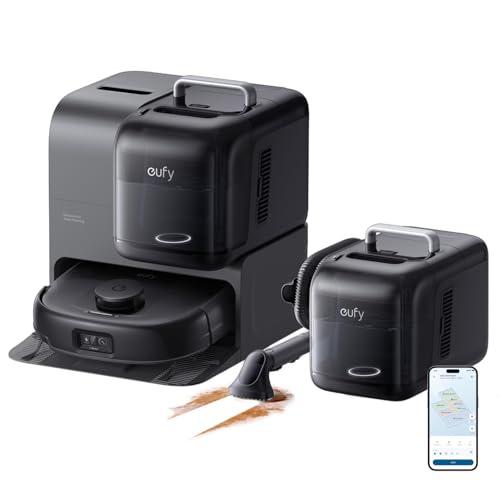
eufy E28 robot vacuum delivers 20000Pa suction, self-washing HydroJet mop, carpet deep cleaner & zero-tangling brushes. Shop now for hands-free clean.
3. iRobot Roomba Vac Q0120
Rating: 4.0/5 | 51,000+ reviews
View the iRobot Roomba Vac Q0120
iRobot is the most recognized name in robot vacuums, and the Roomba Vac Q0120 represents the brand’s approach to reliable, accessible cleaning. Its 3-Stage Cleaning System handles both carpet and hard floors without mode switching, and methodical row-by-row navigation means systematic coverage rather than random bouncing — so the user does not need to wonder whether the robot cleaned a particular area.
Up to 120 minutes of runtime covers most single-floor homes in a single session. When the battery drops, the robot automatically returns to its charging dock and recharges, then resumes where it left off. Cliff Detect sensors prevent the robot from falling down stairs or off elevated surfaces — a critical safety feature in any home where the robot might approach a staircase.
The iRobot Home App supports scheduling, Clean Map reports, and iRobot’s “Clean While I’m Away” feature, which automatically runs the robot when the user leaves home based on learned behavior patterns.
Why it works for seniors: Amazon Alexa compatibility is native and well-established — iRobot’s Alexa integration is one of the most reliable in the industry. The iRobot Home App is among the more user-friendly in the category, with clear scheduling and simple operation. For a senior who already uses Echo devices, this is one of the most natural integrations available.
Considerations: This model does not include a self-emptying base, so the dustbin will need manual emptying periodically. For an elderly user who cannot bend easily, choosing a self-emptying variant or pairing this model with the Clean Base accessory (sold separately) is worth considering.

iRobot Roomba Vac Q0120 robot vacuum with 3-stage cleaning, 120-min runtime & Alexa support. Self-charging & app-controlled. See why 50,000+ owners love it!
4. Shark IQ RV1001AE Self-Empty Robot Vacuum
Rating: 4.2/5 | 27,000+ reviews
The Shark IQ RV1001AE brings together self-emptying convenience, home mapping, and targeted room-by-room cleaning in a well-established, highly reviewed package. Its 45-day bagless self-emptying base is one of the longest-capacity options in this segment, meaning an elderly user could realistically go a month and a half between any interaction with the waste collection system.
IQ Navigation builds a full map of the home and supports room-by-room cleaning commands. Rather than running a complete whole-home clean every time, a user — or a family member setting up the schedule — can direct the robot to clean only the kitchen on Monday, the living room on Wednesday, and run a full clean on weekends. Row-by-row cleaning ensures thorough, predictable coverage in every mapped zone.
The self-cleaning anti-hair-wrap brushroll is a significant practical advantage: it actively prevents hair from tangling around the brush roll, reducing the frequency of brush maintenance considerably.
Why it works for seniors: Works with both Alexa and Google Assistant for complete voice control. The 45-day emptying interval is among the best available. IQ Navigation provides reliable, predictable cleaning that builds trust — the robot does what it says it will do. The SharkClean app is clearly laid out and approachable for users who are moderately comfortable with smartphones.
Considerations: No mopping function, which is relevant if the user has a significant proportion of hard floors. BotBoundary physical strips — rather than app-based virtual walls — are used to create keep-out zones, which requires occasional physical placement.

Shark IQ robot vacuum empties itself for 45 days, maps your home, and features a self-cleaning brushroll. Perfect for pet hair. Works with Alexa. Shop now!
5. iRobot Roomba 694
Rating: 4.2/5 | 25,000+ reviews
The iRobot Roomba 694 is the most accessible entry point into the robot vacuum category from a trusted brand. It learns the user’s cleaning habits and suggests personalized schedules through iRobot OS — meaning the robot can essentially begin scheduling itself based on how the household is actually used. Dirt Detect technology identifies areas with higher debris concentration and spends additional time cleaning those zones, delivering smarter cleaning without any user input.
Dual multi-surface brushes handle carpet and hard floors without any setting changes. The auto-return charging means the robot never gets stranded in the middle of the floor — it always finds its way back to the base. Cliff Detect prevents falls down stairs.
Why it works for seniors: This is the most budget-accessible recommendation on this list, making it an excellent choice for families buying a first robot vacuum for a parent or grandparent who is not yet certain how they will use it. Alexa and Google Assistant support is native. The learning-based scheduling is genuinely useful — over the first two weeks of use, the robot develops a reliable automatic schedule without anyone needing to configure anything in the app.
Considerations: No self-emptying base is included, and the dustbin is on the smaller side, so manual emptying will be needed more frequently than on the other models. The random navigation pattern (rather than systematic row-by-row) means coverage is less predictable, though the Dirt Detect system compensates meaningfully in practice.
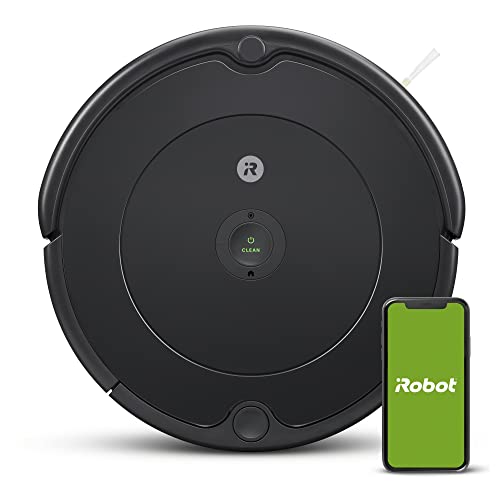
The iRobot Roomba 694 self-charges, navigates around furniture, and tackles pet hair on carpets and hard floors. Shop now for smarter daily cleaning.
Setup Guide for Non-Tech-Savvy Elderly Users
Setting up a robot vacuum for the first time can feel complicated if you are unfamiliar with smartphone apps or Wi-Fi networks. Here is a straightforward process that works for most models.
Step 1: Choose the dock location. Place the charging dock against a flat wall with at least 1.5 feet of clear space on either side and 4 feet of clear space in front. Keep it away from stairs. Plug it into a standard wall outlet. This is the only location it needs to be.
Step 2: Charge the robot fully first. Place the robot on the dock and let it charge completely before first use. Most models take 2 to 3 hours. A light indicator on the robot or dock will show when charging is complete.
Step 3: Download the companion app (optional but recommended for scheduling). Have a family member download the appropriate app on a smartphone — iRobot Home, eufy Clean, or SharkClean depending on the model. Connect the robot to the home Wi-Fi network following the in-app instructions. Use the 2.4GHz network if the router broadcasts both 2.4GHz and 5GHz.
Step 4: Set a daily schedule. In the app, set the robot to run once per day at a consistent time — mid-morning typically works well, when the user is awake but not in the middle of a meal. Set it and forget it.
Step 5: Connect to Alexa or Google Home. In the Alexa app, enable the appropriate skill (iRobot Skill, eufy Clean Skill, or Shark SharkClean Skill). Once linked, the user can say “Alexa, start vacuuming” to begin a cleaning run at any time without touching the app or the robot.
Step 6: First cleaning run. Let the robot run a complete clean of the home. For mapping-capable robots, this first run builds the floor plan used for all future cleaning sessions. Walk through the home after the first run and note any areas the robot consistently missed — furniture that may need slight repositioning, or rooms that need doors propped open.
Buying a Robot Vacuum as a Gift for an Elderly Family Member
If you are purchasing a robot vacuum for a parent, grandparent, or other elderly relative, a few additional considerations will make the gift genuinely useful rather than a frustrating unused appliance.
Handle the full setup yourself. The single greatest gift alongside the robot vacuum itself is showing up and doing the complete setup: unboxing, placing the dock, downloading the app, connecting to Wi-Fi, setting the schedule, and linking to Alexa or Google Home. Leave the person with a single phrase they need to remember — “Alexa, start cleaning” — and walk through it with them until it feels natural.
Choose a self-emptying model. The more maintenance-free the robot is, the more consistently it will actually be used. A standard robot whose dustbin fills up after two runs and no one empties it is effectively useless. A self-emptying model with 45-day capacity stays useful for months without intervention.
Label the dock. A simple piece of tape with the text “Vacuum Charger — Always Keep Plugged In” on the power cord or dock body prevents the common situation where the dock gets unplugged during cleaning and the robot cannot find home.
Consider pet hair if applicable. If the home includes cats or dogs, prioritize models with anti-tangle brush systems. A brush roll tangled with pet hair will stall the robot and require manual clearing — defeating the purpose of autonomous operation.
Note Wi-Fi network information. Before setup day, confirm the home’s Wi-Fi network name and password, and verify whether the router broadcasts 2.4GHz (which all robot vacuums require) rather than 5GHz only.
Give a follow-up visit. Plan to return within two weeks of setup to address any questions, check that the robot is running its schedule correctly, and handle any firmware updates that may have been released.
Frequently Asked Questions
Is a robot vacuum a good idea for elderly people?
Yes, for most elderly individuals a robot vacuum is one of the most practical home devices available. It eliminates the need for physical vacuuming entirely, can be scheduled to run automatically every day, and requires minimal technical interaction — especially with voice control through Alexa or Google Assistant. The main consideration is whether the elderly person will have assistance with initial setup. Once operational, the ongoing maintenance burden is very low.
Can a robot vacuum be controlled without a smartphone or app?
Yes. All of the models recommended in this guide can be controlled using voice commands through an Amazon Echo or Google Nest device. Many also have a single large button on the robot itself that starts a cleaning run when pressed. Once a schedule is set up by a family member, the robot runs automatically without any interaction at all.
How often does a robot vacuum need to be maintained?
Without a self-emptying base, the dustbin typically needs emptying after every 1 to 3 cleaning runs depending on home size and debris levels. With a self-emptying base station, the onboard collection bin needs to be emptied every 30 to 45 days. Brush rolls should be inspected monthly and cleared of any tangled hair or string. Filters typically need replacing every 2 to 3 months. Overall, maintenance is minimal compared to a traditional vacuum.
What happens if the robot gets stuck?
Most modern robot vacuums with reliable navigation (LiDAR or structured-light mapping) rarely get stuck in typical home environments. When they do, the robot sends an alert through the companion app and may also announce the issue through a connected Alexa device. In most cases, the solution is simply lifting the robot, clearing the obstruction, and placing it back on its dock. Robot vacuums should not be left to run in rooms with excessive loose cables or items on the floor.
How loud is a robot vacuum?
Robot vacuums typically operate between 60 and 72 decibels depending on the suction setting — comparable to a normal conversation or a quiet dishwasher. This is significantly quieter than most upright or canister vacuums. Many models include a quiet or eco cleaning mode that reduces noise further, suitable for running during rest periods or at night in a quiet home.
Can a robot vacuum handle thick rugs or multiple floor types?
Yes. All of the recommended models in this guide handle transitions between hard floors and low-to-medium pile carpets and rugs without user intervention. High-pile shag rugs or very thick carpets may exceed the height clearance of some models. Robots with automatic carpet detection — like the eufy E28 — boost suction power automatically when moving from hard floors to carpet, ensuring effective cleaning on both surfaces.
What if the internet or Wi-Fi goes out?
All robot vacuums can be started manually using the button on the robot itself, regardless of internet connectivity. The robot will run a complete cleaning cycle and return to its dock without requiring any app or cloud connection. Wi-Fi and app features (remote start, scheduling, maps) require a working internet connection, but basic operation is always available locally.
Conclusion
For elderly individuals who want to maintain clean, safe floors without the physical demands of traditional vacuuming, a robot vacuum is not a luxury — it is a practical solution to a genuine daily challenge. The best robot vacuums for elderly users combine self-emptying base stations that eliminate frequent bin maintenance, reliable navigation that cleans thoroughly without supervision, and voice control integration that makes the entire experience as simple as saying two words to an Alexa device.
Among the options in this guide, the eufy Omni C20 stands out as the best all-around choice for most elderly users: its all-in-one station is truly maintenance-free, its navigation is reliable, and its eufy app is accessible. Families who want to step up to even more powerful cleaning will find the eufy E28 worth the premium, while those looking for trusted brand recognition and deep Alexa integration will find the iRobot Roomba Q0120 and Shark IQ RV1001AE compelling options. The Roomba 694 remains the right starting point for those who want to introduce the concept at a lower initial investment.
In every case, the real value of a robot vacuum for an elderly user is the same: floors that stay clean every single day, without any effort, without any risk, and without anyone needing to ask for help.
VacuumExperts independently researches and reviews vacuum cleaners. As an Amazon Associate we may earn from qualifying purchases made through links on this page.
Ready to Find Your Perfect Vacuum?
Browse our expertly reviewed vacuum cleaners and make an informed decision
Browse All Vacuums