Why Is My Vacuum Losing Suction? 8 Causes & Easy Fixes
Vacuum losing suction? Here are the 8 most common causes and step-by-step fixes to restore full power to your vacuum cleaner.
Table of Contents
- Why Is My Vacuum Losing Suction? 8 Causes & Easy Fixes
- Why Suction Loss Matters (and Why It Happens)
- The 8 Most Common Causes of Vacuum Suction Loss
- Step-by-Step Troubleshooting Guide: Start Here
- When to Clean vs. Replace Your Filters
- When It Is Time to Buy a New Vacuum
- Quick Reference: Suction Loss Cause and Fix Summary
- Final Thoughts
- Top Picks
Why Is My Vacuum Losing Suction? 8 Causes & Easy Fixes
Reduced suction is the single most common complaint vacuum owners bring to repair shops — and repair technicians will tell you the same thing every time: in the vast majority of cases, it is completely fixable at home in under 15 minutes. Whether your upright is barely picking up crumbs, your cordless stick feels like it is blowing air instead of pulling it, or your canister sounds powerful but leaves debris behind, the culprit is almost always one of eight specific issues. None of them require technical expertise, and most require nothing more than a trash can, a pair of scissors, and a few minutes of your time.
This guide walks through every cause systematically — from the simplest fix to the most serious — so you can diagnose exactly what is happening with your machine and restore it to full working order.
Why Suction Loss Matters (and Why It Happens)
A vacuum cleaner is essentially a sealed system. The motor spins an impeller that creates a pressure difference, pulling air — and debris with it — through a specific path: the floor nozzle, up the wand or hose, through the dust collection chamber, and then through one or more filters before the air is exhausted. Every single component in that chain must be clear and airtight for the system to work at full capacity.
Any restriction in airflow — a clog, a dirty filter, a broken seal — reduces the pressure differential and, with it, the suction power you feel at the floor. The fix is almost always restoring that unobstructed airflow path. Understanding this principle makes diagnosing your specific vacuum much easier.
The 8 Most Common Causes of Vacuum Suction Loss
1. Full Dust Bin or Bag
Difficulty: Easiest fix possible
This is the number one cause of suction loss and the first thing you should always check. Both bagged and bagless vacuums are severely affected when their collection chambers are full or even close to full.
In a bagless vacuum, a bin that is stuffed to capacity restricts the airflow path through the cyclone or filter inlet. In a bagged vacuum, the particles coating the inside surface of the bag create resistance, and a full bag can reduce suction by 50% or more even before the bag visually looks overflowing.
How to diagnose it:
- On a bagless model, look at the bin. If debris is at or past the MAX fill line, that is your problem.
- On a bagged model, remove the bag. A bag that feels heavy, looks gray or beige throughout (rather than white/translucent at the bottom), or collapses when you squeeze it firmly is full.
The fix:
- Empty or replace immediately.
- For bagless bins, rinse the bin with water and allow it to dry completely before reinstalling.
- Do not wait for the bin or bag to be completely full before emptying. The standard recommendation is to empty when two-thirds full to maintain consistent suction.
2. Clogged Filter (HEPA or Foam)
Difficulty: Very easy
Modern vacuums use one or more filters — typically a pre-motor foam or felt filter, a post-motor exhaust filter, and in many cases a HEPA filter — to trap fine particles before the exhaust air re-enters your home. These filters are designed to capture microscopic debris, which means they clog over time. A clogged filter is the second most common cause of suction loss and is often overlooked because the filter is tucked out of sight.
How to diagnose it:
- Locate all filters in your vacuum (consult your manual or look for panels on the body, underside, or back of the unit).
- Remove each filter and hold it up to a light source. A gray, darkened, or visibly dusty filter is restricting airflow.
- Some vacuums have an indicator light that signals when a filter needs attention — but do not rely on this alone, as the sensor is not always sensitive enough.
The fix:
- Washable filters: Tap gently over a trash can to dislodge loose debris, then rinse under cold running water (never hot) until the water runs clear. Do not use soap unless the manufacturer specifically permits it. Allow the filter to air-dry for a minimum of 24 hours before reinstalling. Installing a wet filter will damage the motor.
- Non-washable filters: These must be replaced. Tapping them can remove some surface dust but does not restore full filtration or airflow.
When to replace instead of wash: See the dedicated section later in this article.
3. Blockage in the Hose, Wand, or Floor Nozzle
Difficulty: Easy
A solid blockage — a sock, a clump of hair, a piece of debris that is too large — can completely obstruct the airflow path in the hose, wand, or floor attachment. Unlike a clogged filter, a blockage of this type often causes suction to drop dramatically and suddenly rather than gradually over time.
How to diagnose it:
- Detach the hose from the vacuum body and the floor tool from the other end.
- Shine a flashlight through one end and look through the other. If you cannot see light, you have a blockage.
- Alternatively, drop a coin or a small marble into one end — if it does not come out the other, something is lodged inside.
- For wands (the straight rigid extension tube), slide a broom handle or long dowel through it to push out any obstruction.
The fix:
- For hoses, straighten the hose as much as possible and push a broom handle, a straightened wire coat hanger (with the sharp end taped), or a long flexible brush through to dislodge the blockage.
- For floor nozzles and brush attachments, turn them over and look for debris packed into the intake channel. Most can be cleared with your fingers or a pair of needle-nose pliers.
- After clearing, test suction at the hose inlet on the vacuum body before reattaching the floor tool. This lets you confirm the machine itself is working and the blockage is gone.
4. Dirty Brush Roll (Hair and Thread Wrapped Around)
Difficulty: Easy with scissors
The brush roll (also called a beater bar or agitator brush) is the spinning cylindrical brush inside the floor head that agitates carpet fibers and drives debris into the suction path. It is also a debris trap. Hair, thread, string, and carpet fibers wrap around it constantly during use. Once enough material accumulates, the brush roll slows, the floor nozzle sits higher off the ground, and suction at the floor drops noticeably. In severe cases, the brush roll can stop spinning entirely.
How to diagnose it:
- Flip the floor head over and inspect the brush roll.
- Look for wrapped material — hair, thread, string, or fibrous debris. If you see rings or bands of tangled material around the ends or center of the brush, this is contributing to reduced performance.
- Try spinning the brush roll by hand. It should spin freely with minimal resistance. A brush roll that is hard to spin by hand has too much wrapped material or a worn bearing.
The fix:
- Use a seam ripper, a small pair of scissors, or a dedicated brush roll cleaning tool to cut through wrapped hair and thread in sections.
- Work from the center outward toward the end caps, then pull the cut material away.
- On many vacuums, the brush roll can be fully removed by pressing tabs on either side of the floor head — removing it makes cleaning far easier.
- After cleaning, check that the brush roll spins freely before reinstalling.
- If the brush ends (the bristle tips) look worn, splayed outward, or significantly shorter than they should be, it is time for a brush roll replacement rather than just a cleaning.
5. Cracked or Loose Hose Connection
Difficulty: Easy to diagnose, moderate to fix
Because a vacuum is a sealed airflow system, any air leak — anywhere in the path — reduces suction. A hose that has developed a crack, a pinhole, or a loose fit at either connection point allows ambient air to enter the system, equalizing pressure and reducing the pull at the floor nozzle. Small cracks can be surprisingly significant.
How to diagnose it:
- Run your hand slowly along the entire length of the hose while the vacuum is running. You should feel airflow coming from any crack or pinhole.
- Check the connection points at both ends of the hose where it meets the vacuum body and where it meets the wand or floor tool. Wiggle the connection — it should be firmly seated with no gap.
- Visually inspect the hose for kinks, bends, or areas where the outer coating looks cracked or worn.
The fix:
- A loose connection can often be solved by reseating the hose or cleaning the connection port of any debris preventing a full seal.
- Pinhole cracks can be temporarily repaired with strong rubber or silicone tape, wound tightly around the affected section.
- A hose with significant cracking or multiple pinholes should be replaced. Replacement hoses for most major brands (Dyson, Shark, Miele, Hoover) are available for $15–$40 and are usually straightforward to swap.
6. Worn or Damaged Seal or Gasket
Difficulty: Moderate
Inside the vacuum body, rubber seals and gaskets create airtight connections between the dust bin or bag chamber, the motor housing, and the filter compartments. These seals degrade over time — they crack, compress, or shift out of position — and when they do, air bypasses the sealed path, reducing suction without any obvious blockage.
How to diagnose it:
- After emptying the bin and checking the filters, look at the seating areas where the bin or bag compartment meets the vacuum body. Run a finger around the rim — the seal should be smooth, continuous, and firmly seated.
- Remove and reinsert the dust bin. Listen for a click or positive engagement. If the bin feels loose or wobbly, the seal may be worn.
- On some vacuums, you can see daylight or feel air leaking at the bin-to-body junction while the vacuum runs — this confirms a seal problem.
The fix:
- If the seal has simply shifted out of its groove, press it firmly back into position.
- Cracked or compressed seals need to be replaced. Look up your vacuum’s model number and search for “seal kit” or “gasket kit.” These are inexpensive parts, typically under $10.
- On older vacuums, this repair may not be cost-effective if the machine has other wear issues as well.
7. Brush Roll Motor Failure (Cordless Stick Vacuums)
Difficulty: Moderate — often requires professional repair or replacement
Most cordless stick vacuums use a separate small motor to drive the brush roll in the floor head, independent of the main suction motor. This brush roll motor is exposed to hair, debris, and heat, and it can fail on its own while the suction motor continues working normally. The result is a vacuum that appears to have suction but is not picking up carpet debris effectively because the brush roll has stopped spinning.
How to diagnose it:
- Place your hand near the brush roll area while the vacuum runs on a hard floor. You should feel air movement and see or hear the brush roll spinning.
- Flip the floor head over while the vacuum is running (carefully). The brush roll should be visibly spinning. If it is stationary, the motor has likely failed.
- Some cordless vacuums display an error light on the body or floor head when the brush roll motor is blocked or failed — check your manual.
The fix:
- First, clean the brush roll thoroughly (see Cause 4). A badly clogged brush roll can stall the motor as a self-protection measure, and clearing the blockage may resolve the issue.
- If the brush roll is clean but still not spinning, the motor has failed. On most cordless stick vacuums, the entire floor head is a replaceable part — replacement floor heads for popular models (Dyson V-series, Shark IZ, Bissell Iconpet) typically cost $40–$90 and can restore full function.
- A failed brush roll motor alone does not mean you need a new vacuum, but it does mean a repair or part replacement is necessary.
8. Motor Wear on Older Vacuums
Difficulty: This is the “honest assessment” cause
Vacuum motors have a finite lifespan — typically 500 to 1,000 hours of run time for consumer-grade machines. As the motor ages, its impeller wears, bearings degrade, and the carbon brushes (in brushed DC motors) wear down, all of which reduce the motor’s ability to generate the pressure differential that creates suction. This type of suction loss is gradual, progressive, and not fixable through cleaning or maintenance.
How to diagnose it:
- If you have thoroughly checked and cleaned every other component in this list and suction is still noticeably weaker than it once was, motor wear is the likely cause.
- A worn motor often also produces a higher-pitched whine, a burning smell during use, or takes noticeably longer to reach full speed when turned on.
- Vacuums that are 8–12+ years old with regular use are candidates for motor wear.
The fix:
- Motor replacement is possible but expensive — often $60–$120 for the part alone, plus labor if you are not doing it yourself. On a vacuum that cost $150 originally, this rarely makes financial sense.
- This is the situation where buying a new vacuum is the correct answer. See the section below.
Step-by-Step Troubleshooting Guide: Start Here
Work through these steps in order before assuming a serious problem. Most suction loss issues are resolved within the first three steps.
Step 1 — Empty the bin or replace the bag. Do this first, always. Do not skip it.
Step 2 — Remove and inspect every filter. Check whether each filter is washable or non-washable. Wash what can be washed; replace what cannot. Do not run the vacuum until all filters are fully dry.
Step 3 — Check for blockages. Detach the hose and wand and visually inspect each section for obstructions. Clear any blockage you find.
Step 4 — Clean the brush roll. Flip the floor head over and remove any wrapped hair, thread, or fibrous debris from the brush roll.
Step 5 — Inspect hose connections and seals. With the vacuum running, run your hand along the hose and around connection points. Feel for air leaks.
Step 6 — Test each section independently. After cleaning, test suction at the vacuum body’s inlet port (without the hose attached). Then test with the hose attached. Then add the wand. Then the floor head. This step-by-step attachment process isolates which component, if any, is still causing reduced airflow.
Step 7 — If suction is still poor at the body inlet itself, the issue is internal — a worn seal, a filter not seating correctly, a brush roll motor problem (on cordless), or motor wear. Proceed to those specific causes above.
When to Clean vs. Replace Your Filters
This is one of the most frequently misunderstood aspects of vacuum maintenance.
Wash your filter if:
- The manufacturer explicitly labels it as washable (look for “rinse to clean” language in the manual or on the filter itself).
- The filter is gray and dusty but still structurally intact (no tears, no collapsed pleats).
- You are washing it regularly — every 1–3 months depending on use frequency.
Replace your filter if:
- It is labeled as non-washable (standard pleated paper or charcoal filters).
- It has visible tears, holes, or collapsed/compressed sections that washing will not restore.
- It has been washed more than 10–12 times and no longer comes fully clean.
- Your vacuum’s performance did not improve after a thorough wash and full 24-hour dry.
- It is more than 12 months old with regular weekly use.
Most manufacturers recommend replacing HEPA and foam filters every 6–12 months. Replacement filters for popular vacuums cost $10–$30 and are one of the best investments in maintaining full performance.
When It Is Time to Buy a New Vacuum
Vacuums are designed to be maintained, not immortal, and there is a point where repair costs exceed the value of the machine. Consider buying a new vacuum when:
- The motor is worn and the vacuum is more than 8 years old. Repair costs will approach or exceed the price of a new, better machine.
- Multiple components have failed simultaneously (brush roll motor plus worn seals plus degraded filters on a cordless stick that is 4+ years old).
- Replacement parts are unavailable. For discontinued or budget models, manufacturer parts disappear quickly. If you cannot find a replacement hose, filter, or brush roll, maintenance becomes impossible.
- You have checked every cause in this guide and suction is still poor. At that point, the issue is internal motor degradation, which is not user-serviceable on most consumer vacuums.
- The cost to repair exceeds 50% of the cost to replace. This is the standard rule of thumb for appliance repair decisions.
If you are in this situation, it is worth reading our guides on the best vacuums for your specific needs before purchasing — the difference in performance between a budget replacement and a mid-range model from Dyson, Shark, or Miele is significant, and making the right choice now saves you from dealing with the same suction issues in 18 months.
Quick Reference: Suction Loss Cause and Fix Summary
| Cause | Symptom | Fix |
|---|---|---|
| Full bin/bag | Gradual suction drop | Empty or replace |
| Clogged filter | Gradual suction drop, musty exhaust | Wash or replace filter |
| Hose/wand blockage | Sudden suction drop | Clear blockage |
| Dirty brush roll | Poor carpet pickup | Cut and remove wrapped debris |
| Cracked hose | Consistent weak suction | Tape or replace hose |
| Worn seal/gasket | Weak suction, air leak sound | Reseat or replace seal |
| Brush roll motor failure | No carpet agitation, suction present | Replace floor head |
| Motor wear | Gradual long-term decline | Consider new vacuum |
Final Thoughts
Suction loss is frustrating, but it is almost never a death sentence for your vacuum. In the overwhelming majority of cases — somewhere around 85–90% based on repair data — the cause is a full bin, a dirty filter, a blockage, or a wrapped brush roll. All four of these take under 10 minutes to address and cost nothing.
Work through the diagnostic steps in order, start with the simplest causes, and resist the urge to assume you need a new vacuum until you have genuinely ruled out all eight causes above. Most vacuums have years of useful life left in them — they just need a little attention.
Top Picks

Bissell CleanView XR cordless vacuum: 200W motor, 35-min runtime, tangle-free brush roll & 3-in-1 design. Top-rated stick vacuum for home. Shop now.

Bissell Featherweight stick vacuum weighs only 3 lbs and converts into 3 machines. Bagless design with crevice tool for carpet, hard floors, and furniture.

Bissell CleanView XR Pet 300W cordless stick vacuum with 40-min runtime, deep cleaning FurBrush, and removable battery. Expert review with full specs.

Bissell Featherweight 2033M is an ultra-lightweight 3-in-1 bagless stick vacuum for hard floors, carpet, and stairs. Converts to hand vac with crevice tool.
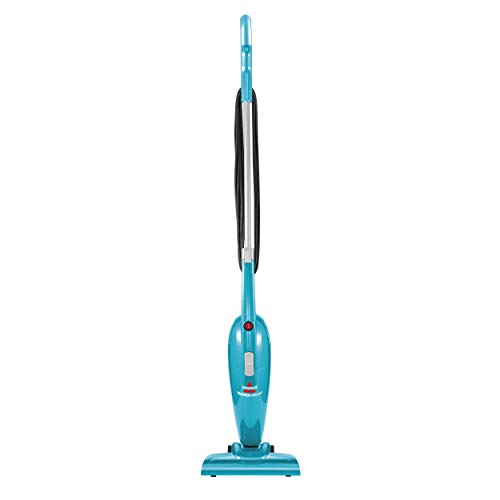
Bissell Featherweight 2033 lightweight stick vacuum converts to handheld. Bagless, corded, with crevice tool for carpets, hard floors, and stairs.
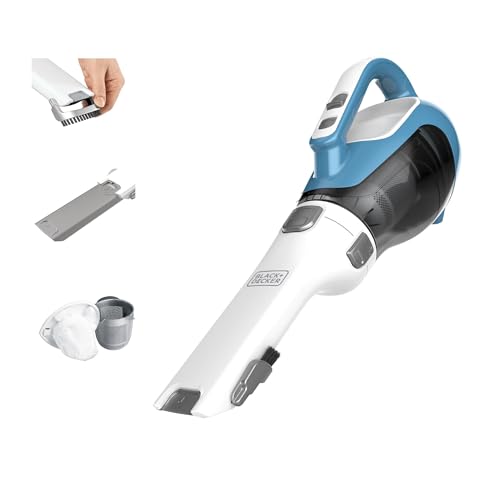
BLACK+DECKER Dustbuster AdvancedClean cordless handheld vacuum with cyclonic suction and 16V battery. Great for home and car. Read our expert review now.
Ready to Find Your Perfect Vacuum?
Browse our expertly reviewed vacuum cleaners and make an informed decision
Browse All Vacuums